📚 1st, Join Our Google Classroom
Step 1 of 3Our DeMolay Knights Google Classroom is where weekly assignments, tournament announcements, and class syllabus updates are posted.
Official Class Portal
DeMolay Class Access Code
iljxmdy
💡 Quick Tip: Click "Join Class" (+) in Google Classroom, then paste code
iljxmdy to get full access.
♟️ 2nd, Create Lichess Account & Join Club
Step 2 of 3Lichess.org is our primary online chess arena for weekly tournaments, puzzles, and live sparring matches.
⚠️ CRITICAL USERNAME RULE: When creating your Lichess username, you MUST attach your real name to it so Mr. Nebiu can verify your account!
Example: John Doe's username should be SauceBoyJohn (not just SauceBoy).
Example: John Doe's username should be SauceBoyJohn (not just SauceBoy).
-
1
Create or Sign In: Register a new account or log in to your existing account at Lichess.org/signup using the username naming rule above.
-
2
Join the DeMolay Knights Team: Once logged in, click the button below to submit a join request to our official team page.
⚙️ 3rd, Configure Notation Settings
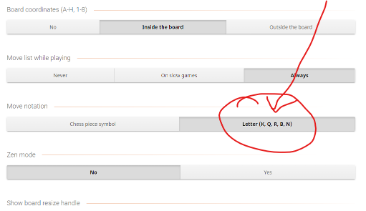
Step 3 of 3To prepare for official USCF tournaments, configure your Lichess account settings to display Letter Notation (N, R, B, Q, K) instead of icons.
-
3
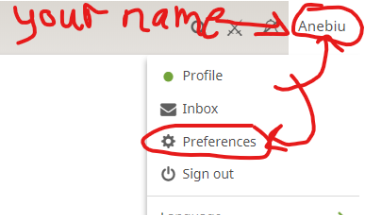
Change Notation to Letter: Go to your Lichess Preferences → Game Display and set Piece Notation to Letter.